Beautiful diagrams,
right inside Jira.
Flowcharts, architecture maps and whiteboards without leaving your issue. Versioned, themed, and stored entirely inside your own Atlassian site — no external accounts, no data leaving your instance.
Free for every user · Installs in one click · No credit card
Everything you need to think visually
A full diagram editor that loads instantly and gets out of your way.
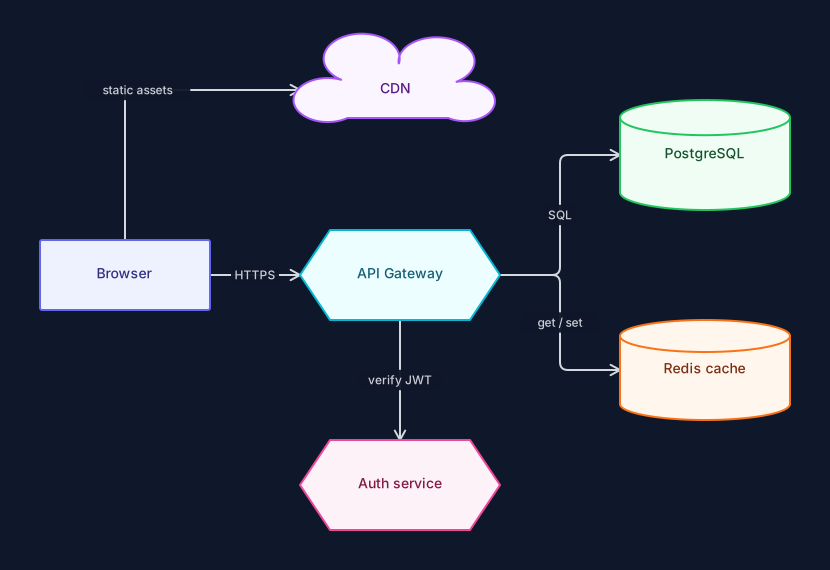
Smart connectors
Drag from any shape edge to connect. Orthogonal, straight or curved routing with clean rounded corners, arrowheads and labels that stay put when you move things.
Snap & align
Alignment guides appear as you drag, with grid snapping you can toggle. Diagrams come out straight without fiddling.
13 shape types
Rectangles, rounded boxes, ellipses, decisions, hexagons, cylinders, clouds, actors, notes, stickies and free text — enough for flowcharts, architecture and ERDs alike.
Auto-arrange
One click lays out the whole diagram with a proper hierarchical algorithm. Great for cleaning up an imported or hastily-drawn graph.
Autosave, always
Every change saves automatically to your Atlassian site. Close the tab mid-thought and come back to exactly where you were.
Export anywhere
PNG at 2× for slides, SVG for crisp vectors, JSON for a lossless backup you can re-import later. All generated in your browser.
See exactly what changed
Save a version before a big edit, then compare any two side by side. Added shapes glow green, changed shapes amber, deleted shapes red — so a design review takes seconds, not a squint.
- Visual diff, not a list of timestamps
- Restore any earlier version in one click
- Keeps your last 30 snapshots per diagram
Make it beautiful instantly
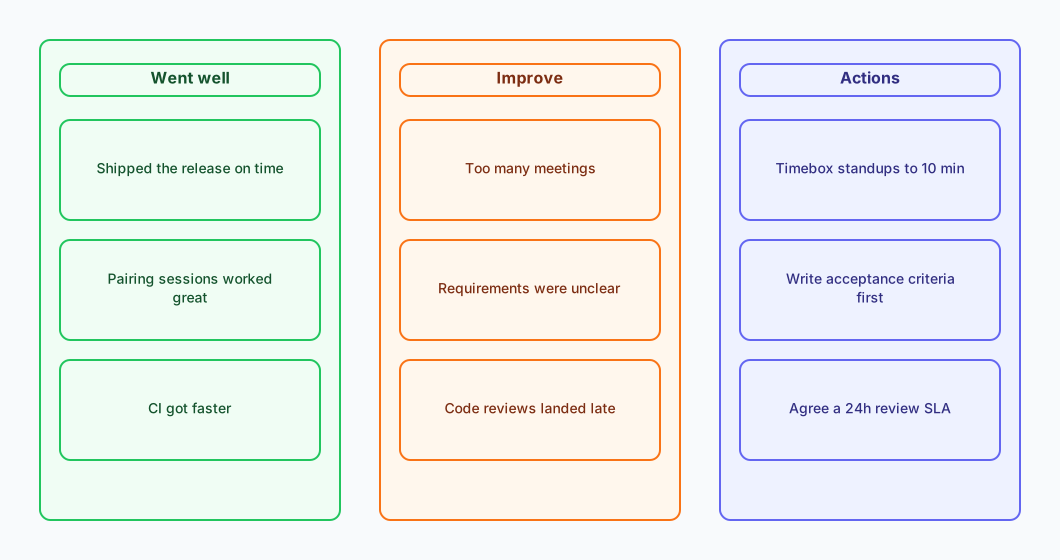
Five coordinated palettes restyle an entire diagram at once — Aurora, Graphite, Ocean, Sunset and Blueprint. Shapes you deliberately custom-coloured are left exactly as you set them.
- Recolours shapes, strokes, labels and connectors together
- Real light and dark rendering that follows your Jira theme
- No washed-out colour inversion — every theme is designed twice
Type it, don't draw it
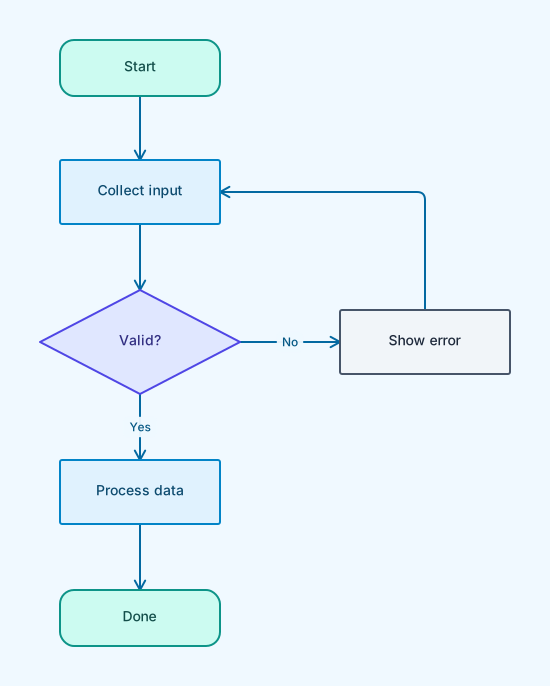
Write a few lines of Mermaid-style flowchart syntax and get real, editable shapes — automatically laid out. Not a picture: every node and connector is yours to move, restyle and extend.
graph LR
  start((Start)) --> check{Logged in?}
  check -->|Yes| home[Show dashboard]
  check -->|No| login[Login form]
  login --> auth[(Auth service)]
  auth --> home

Start from something real
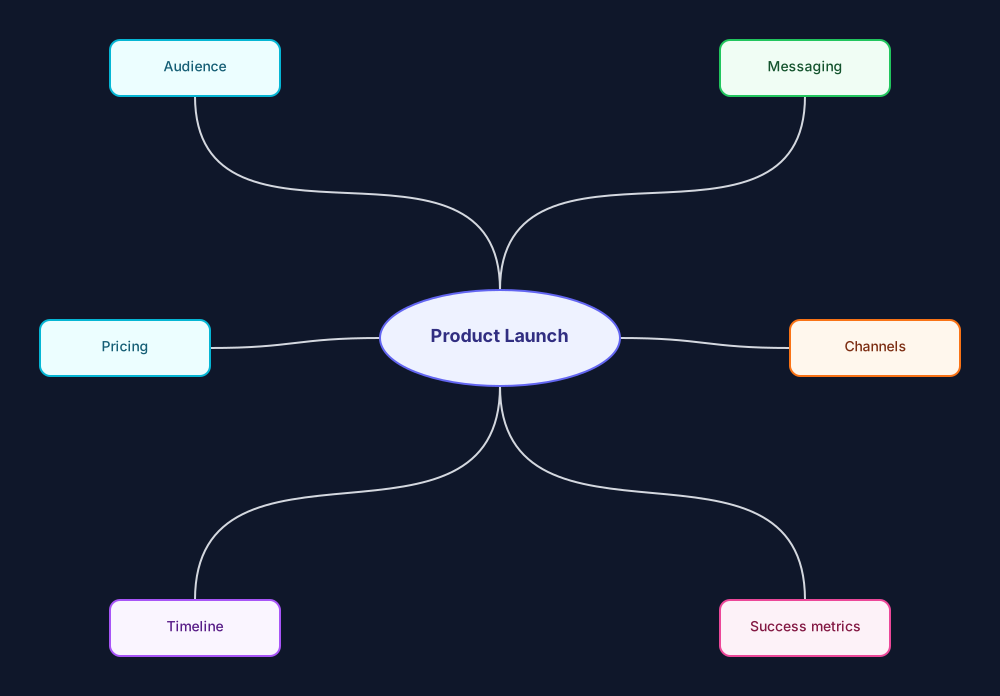
Eight ready-made starting points so a blank canvas is never the obstacle: flowchart, org chart, mind map, SWOT, sprint retrospective, system architecture, user journey and kanban.
- Every template is fully editable, nothing is locked
- Templates adopt whichever theme your diagram is using
- Drop one into an existing diagram to extend it
Your diagrams never leave your site
Most diagramming tools are someone else's cloud with a Jira window bolted on. Aurora isn't.
Zero egress, by design
The app makes no external network calls at all. Not to us, not to a CDN, not to an analytics endpoint. There is nowhere for your data to go.
One permission
Aurora asks for app storage and nothing else. It cannot read your issues, your projects, or your user directory — because it was never granted the ability to.
Runs on Atlassian
Built entirely on Atlassian Forge, so compute and storage stay on Atlassian infrastructure and inherit your site's data residency. We operate no servers of our own.
Nothing to breach, nothing to leak
We do not collect names, email addresses, IP addresses, usage analytics, telemetry or cookies — and we never train anything on your content. Your security team can verify the whole story from the app's manifest: one storage scope, no egress declarations. Read the full privacy policy.
Why teams pick Aurora
The things that quietly make diagramming annoying — fixed.
| What you actually care about | Aurora Diagrams | Typical diagram apps |
|---|---|---|
| Where your diagrams live | Inside your Atlassian site | Often a third-party cloud |
| Dark mode | Designed for it, both themes | Colour inversion, or ignored |
| Comparing two versions | Visual diff, colour-coded | A list of dates, if anything |
| Restyling a finished diagram | One click, whole diagram | Shape by shape |
| Separate account to view | Never | Frequently required |
| Page weight | Around 140 KB, loads instantly | Multi-megabyte editors |
| Price for your whole team | Free | Per-user, every user on the site |
Free while we grow
No seat maths, no tiers, no upsell popups.
Everything, for everyone
Every feature · Every user on your site
- Unlimited diagrams and versions
- All 5 themes and 8 templates
- Text-to-diagram and auto-arrange
- PNG, SVG and JSON export
- Issue panel and full-page workspace
If paid plans ever arrive, they'll apply to new versions with notice — see the terms.
Questions
Where exactly are my diagrams stored?
In Forge storage inside your own Atlassian Cloud site, alongside your other Atlassian data and under your existing agreement with Atlassian. We have no servers and no copy of anything.
Does it work in Confluence too?
Today Aurora is Jira-only: a panel on every issue plus a full-page workspace under Apps. Confluence support is on the roadmap.
Can I get my diagrams out?
Yes, any time. Export to SVG or PNG for sharing, or JSON for a complete lossless copy you can re-import. There's no lock-in.
What happens if we uninstall?
Atlassian removes the app's storage for that installation. Export anything you want to keep first — JSON is the format that round-trips perfectly.
Will it stay free?
It's free today and free for everyone on your site. If paid plans are introduced later, they'd apply to new versions with reasonable notice, and billing would run through the Atlassian Marketplace like any other app.
How do I report a bug or ask for a feature?
Email us — details are on the support page, along with documentation, keyboard shortcuts and troubleshooting.
Start diagramming in about a minute
Install from the Atlassian Marketplace, open any issue, and draw.